Tally Counter: What It Is, How to Use It & Which to Buy
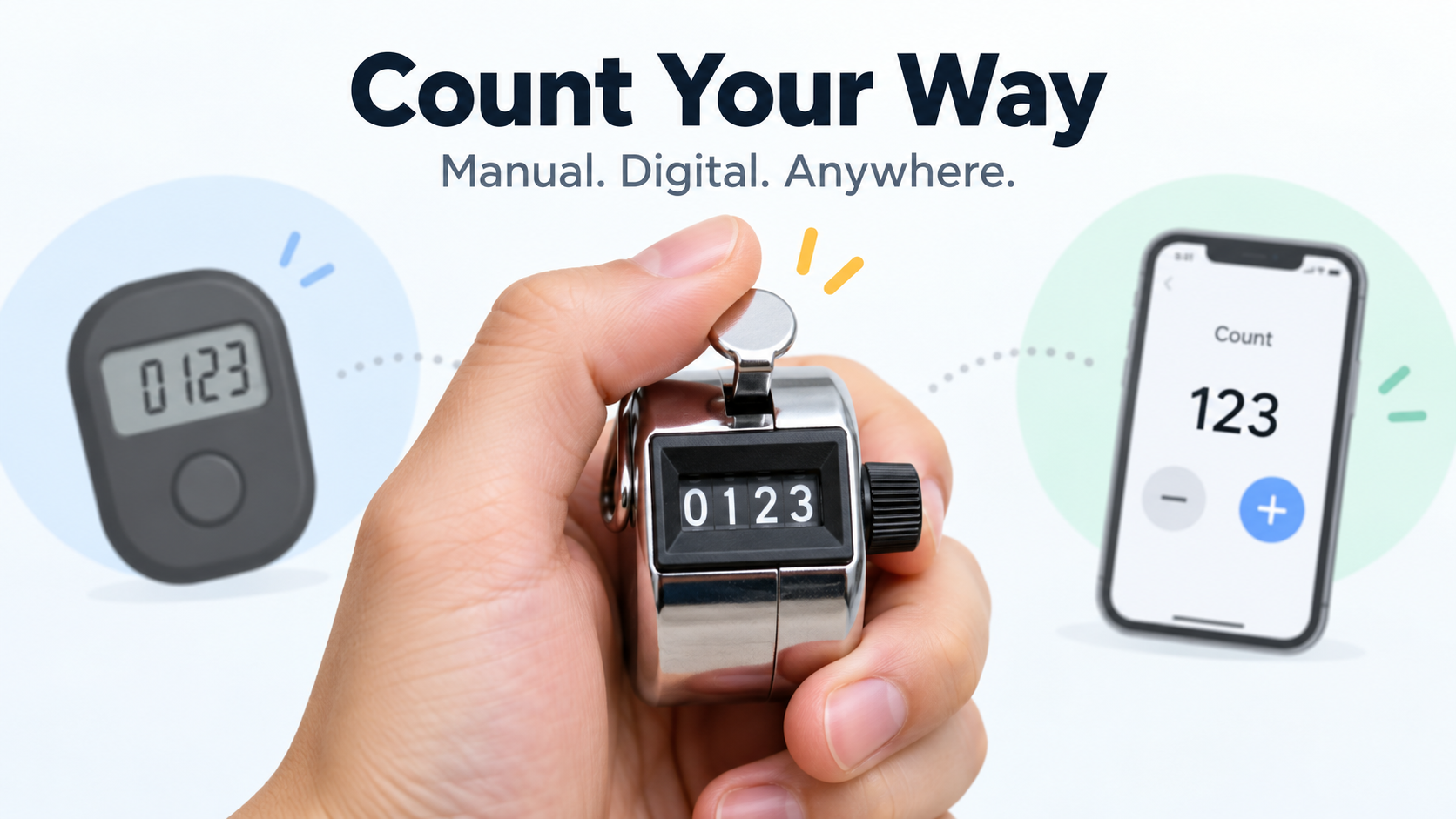
A tally counter is a handheld or digital clicker that keeps a running count — people, laps, reps, or inventory — with one press per item. Most mechanical models show four digits and reset to zero with a rotating knob; phone apps and watch widgets do the same job without hardware.
What Is a Tally Counter?
A tally counter is a small device that adds one to a running total each time you press its button. It records how many times something happened — pitches thrown, laps swum, people through a door — instead of storing a number you choose ahead of time.
That difference matters: it separates a consumer tally counter from an industrial preset counter. A preset counter like the Omron H7CX-AWD1-N Multifunction Preset Counter, which sometimes appears next to tally counters in marketplace listings, is built to count down to a target and trigger an output. A tally counter just adds upward, one press at a time.
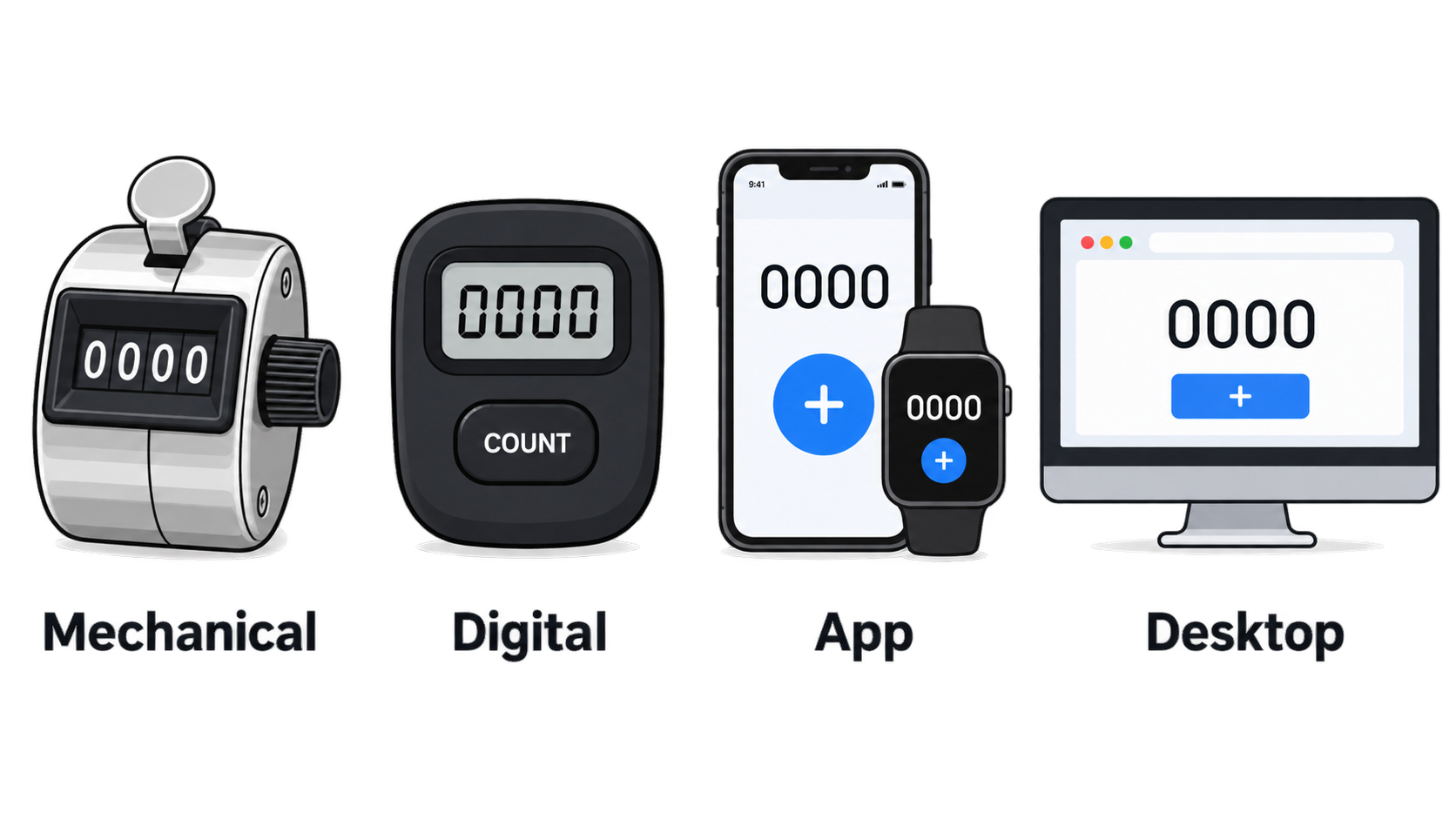
These devices come in four physical forms:
- Mechanical handheld tally counter — a spring-loaded clicker with a numbered wheel and a side reset knob
- Digital tally counter — a battery-powered electronic unit with an LCD or LED readout
- Tally counter app — a phone, tablet, or Apple Watch app that turns a screen tap into a count
- Desktop or browser tools — a free online tally counter for tracking items while seated at a computer
The same device also goes by several names. Clicker counter, hand counter, handheld tally counter, pitch counter, and lap counter all describe the same core mechanism. The label usually reflects the job, not a structural difference.
Tally Counter vs. Tally Marks vs. Clicker: Same Words, Different Things
People often use these three terms interchangeably, but they are not the same. Tally marks are a notation system — marks made on paper or a chalkboard, traditionally grouped in fives. Clicker is casual shorthand for the hardware, borrowed from the sound the button makes. Tally counter is the device itself: a mechanical or digital unit that advances a displayed number automatically.
The practical difference is who keeps track of the total. With tally marks, the person writes and groups the marks in their head. With a tally counter, the mechanism does the arithmetic and the user only presses. Tally marks are still useful when no device is available; a counter is faster when large volumes build up.
The Four Parts of a Standard 4-Digit Hand Tally Counter
Nearly every consumer mechanical tally counter is made from the same four parts.
- The press button — a top-mounted key that moves the counter forward exactly one position per full press.
- The digit display window — four numbered wheels under a small lens, showing a range from 0000 to 9999.
- The reset mechanism — a rotating knob on the side of the housing (some models use a top button) that returns all wheels to zero.
- The housing and internals — a metal or plastic shell around a ratchet-and-spring assembly that moves the wheels.
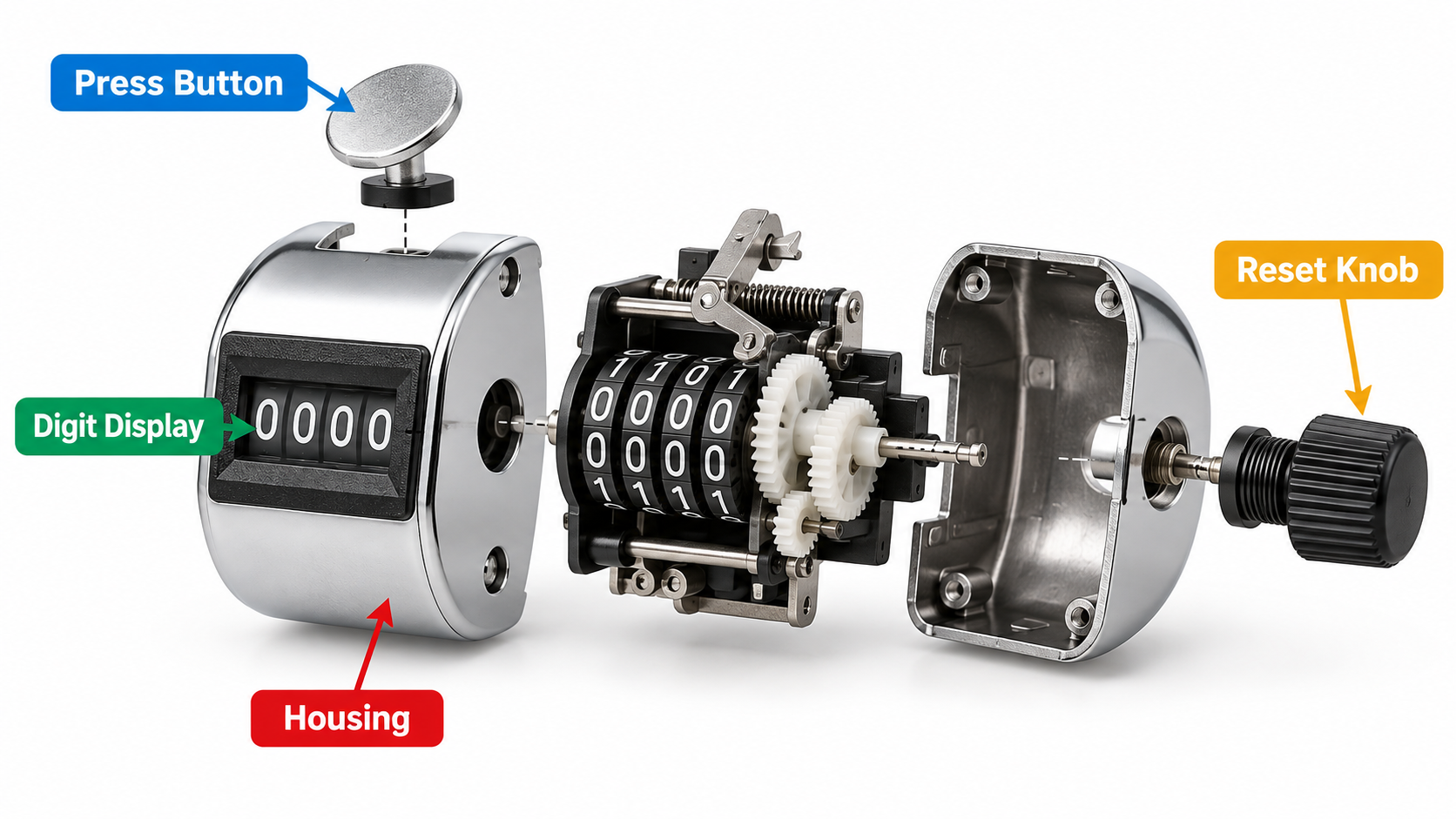
Metal tally counters usually use a metal shell around the same internals, which is why they tend to survive drops and sweaty hands better than plastic-bodied versions. The trade-off is weight.
How to Use a Tally Counter and Reset It to Zero
Using a tally counter is simple, but the problems people run into are almost always mechanical, not conceptual. Full presses, clean resets, and knowing the digit limit solve most of them.
Step by Step: Operating a Handheld Clicker One-Handed
- Grip the body in your non-dominant hand (or dominant, if that hand is free), wrapping your fingers around the housing so the button sits under your thumb.
- Position the display so it faces you, but keep your eyes on the target — the pitcher, the swimmer, the doorway.
- Press the button fully until you feel or hear the click, then release completely. Every full press advances one digit.
- Repeat on each event, keeping a steady rhythm instead of a fast series of partial presses.
- Check the display periodically — every 25 or 50 counts is usually enough — to confirm the number is tracking what you observed.
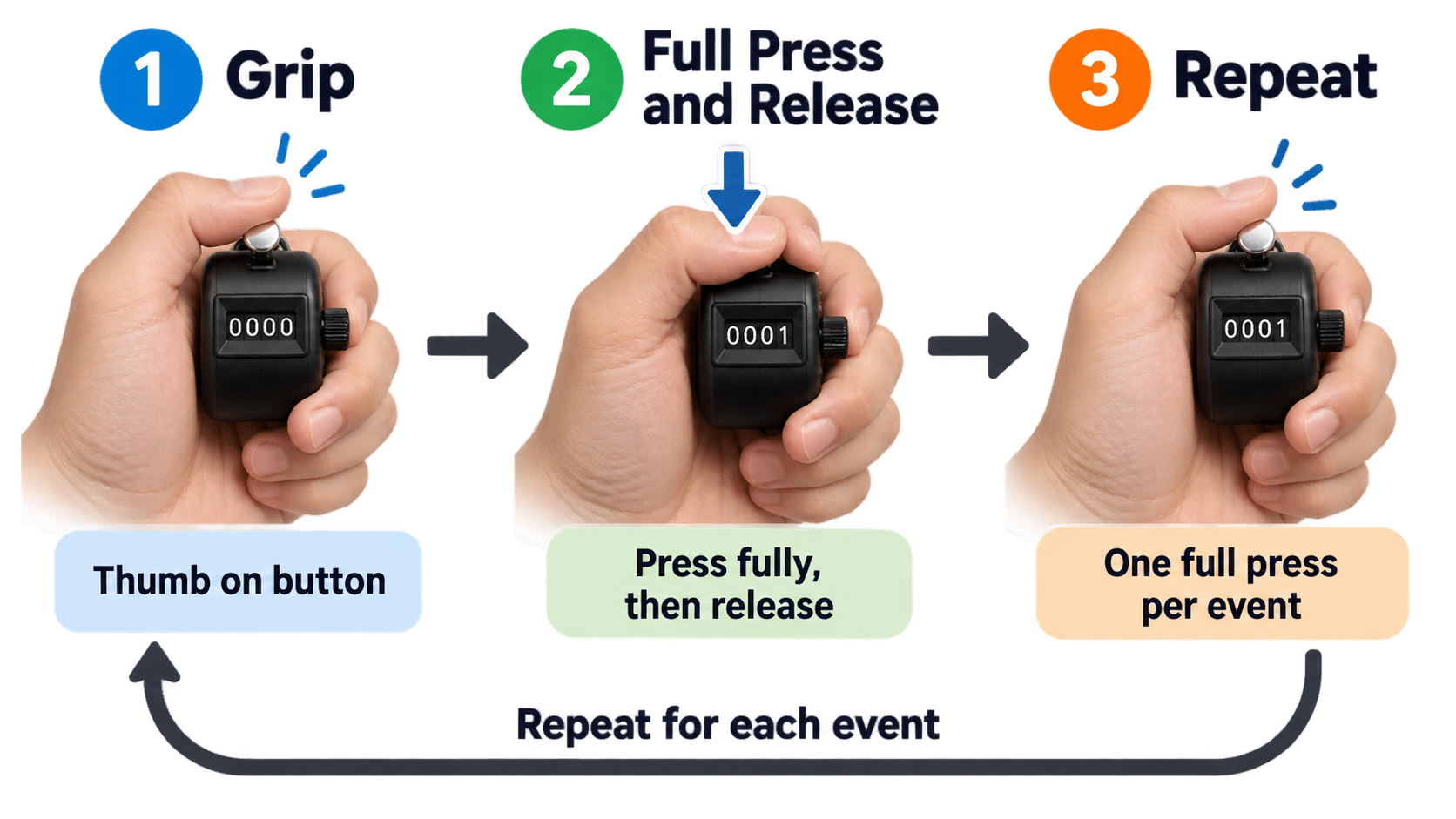
The most common beginner mistake is the half-press. A partial press can fail to register a count, or it can slip past the ratchet and jump two positions. Pressing deliberately, with a clear release between counts, avoids both.
What Happens After 9,999 — and How to Reset
A 4-digit counter holds values from 0000 to 9999. Press the button once more and the display rolls back to 0000 and starts counting again. There is no error state and no lockout — the counter simply loses continuity.
For long continuous counts, that rollover matters. Anyone counting more than 9,999 events in one session needs to either record a subtotal before rollover or use a device with more digits, such as a digital tally counter or an online number counter with no digit ceiling.
Resetting differs by type:
- Mechanical tally counter: rotate the knob on the side of the housing until every wheel reads zero.
- Digital tally counter: press the reset button, or hold it for a second or two on models that require a long press to prevent accidental clearing.
- App: tap the reset icon, swipe the counter, or use the reset control on a widget.
Resetting does not damage the device, but the reset knob is a moving part, and repeated rotation adds wear.
Troubleshooting: Skipped Counts, Stuck Digits, Weak Springs
Most tally counter problems have mechanical causes. Matching the symptom to the cause narrows down the fix quickly.
| Symptom | Likely cause | What to do |
|---|---|---|
| Counts skip or jump by two | Partial press, or worn ratchet teeth | Press fully and deliberately; retire the unit if skipping persists |
| Digits stick or fail to advance | Debris in the wheel mechanism | Clear the window area; avoid lubricants that attract grit |
| Button feels weak or does not return | Fatigued return spring | Replace the unit — springs are not typically user-serviceable |
| Button is stiff or hard to depress | Tight housing or grit around the plunger | Work the button repeatedly; replace if it stays stiff |
App users face a different set of issues: a locked screen preventing a tap, battery drain during long sessions, or an accidental swipe resetting the count. Lock-screen and Dynamic Island widgets reduce — but do not eliminate — the first problem.
Mechanical vs. Digital vs. App: Which Tally Counter Should You Use?
There is no single best tally counter. The right pick depends on how long you count, where you count, and whether you need the data afterward.
A mechanical handheld clicker never needs a battery, has no startup time, and works in rain, cold, or gloves. It stops at four digits and keeps no history. A digital tally counter may offer larger digit ranges, backlighting, and sometimes segmented timing, but it depends on a battery and costs more. A phone or watch app is always with you, supports multiple counters, and can export records — at the cost of battery dependence and screen-based distraction. An online tally counter suits desk work but is useless for one-handed outdoor counting.
Comparison Table: Mechanical Clicker vs. Digital Counter vs. Phone and Watch App
| Feature | Mechanical tally counter | Digital tally counter | Phone / watch app |
|---|---|---|---|
| Power source | None | Battery | Device battery |
| Display | 4-digit wheel window | LCD/LED, often more digits | Screen, unlimited counters |
| Maximum count | 9,999 per cycle | Varies by model, often higher | Effectively unlimited |
| Reset | Side rotating knob | Reset button or long press | Tap, swipe, or widget control |
| Durability | Metal-bodied versions handle drops and sweat well | Depends on housing and sealing | Depends on the phone’s own protection |
| One-handed use | Yes, thumb-operated | Usually yes | Yes, but requires looking at a screen |
| Records and export | None | Rare, model-dependent | Common |
| Best for | Sports, coaching, outdoor work, long sessions | Settings needing larger ranges or backlighting | Everyday counting, habit tracking, multi-counter use |
Tally Counter Apps for iPhone, iPad, and Apple Watch
The App Store listing for Tally Counter: Tap & Count shows what a modern app-based counter can do. The app supports iPhone, iPad, Apple Watch (watchOS 10.0 or later), and Macs with an Apple M1 chip or later on macOS 14.0 or later. It requires iOS 17.0 or later, weighs 30.7 MB, and is rated 4+ in the Utilities category.
Listed features include one-tap counting, unlimited counters, Home Screen and Lock Screen widgets, Dynamic Island and Live Activities, and StandBy widgets. The app is free to download with in-app purchases; the listing states United States pricing of $0.99 per week or $4.99 per year for unlimited access. The most recent version shown is 1.30, dated 7 September.
Other apps in the same category that appear in the App Store’s “You Might Also Like” section include CountHub, Count Me, Countr, Counter Widget 26, and Counter Widget – Tally Counter. If you prefer a desktop tool, browser-based options exist too — though note that a Chrome extension named Tally is a Claude token counter with 100,000 users, not a counting device. Version 0.4.2 was updated August 31, 2026, and pricing runs from a free tier to Pro at $4 per month, $20 per year, or $30 for lifetime access.
Which Tally Counter for Which Job: Pitch, Lap, Rep, Row, and People Counting
The same mechanism shows up in very different settings, and the name usually follows the job. Matching the form factor to the task prevents most buying mistakes.
Sports and Coaching: Pitch Counters and Lap Counters
A pitch counter tracks pitches thrown, usually in baseball and softball, where coaches and parents need an accurate count without taking their eyes off the field. These are typically small, one-handed units that can be worked with the thumb while standing.
A lap counter serves swimmers and runners tracking laps. Mechanical versions work fine for straight lap counts; digital models with segmented recording are more useful when splits matter. In both cases, a metal tally counter body resists sweat and repeated handling better than a plastic one.
People Counting, Inventory, and Field Tallies
Door staff and event teams counting attendees need a large, easy-to-press button, fast reset between shifts, and enough durability to survive being passed from person to person. A handheld tally counter clicker with a metal housing fits that profile.
Retail and warehouse inventory work benefits from counters bought in multi-packs — one unit per aisle or per worker — that accumulate across a full counting session. Outdoor and forestry work has its own tradition: the dot-and-line tally, where dots represent counts from 1 to 4, lines 5 to 8, and diagonal lines 9 and 10. This method appears in forestry literature as far back as an 1898 United States government report on forest mensuration. Paper tallies remain common in the field, and a mechanical counter can complement them when volume grows.
What to Look For in a Handheld Tally Counter: Metal Body, 4-Digit Display, Pack Size
Only a few specs determine whether a tally counter works for you. Digit count, reset mechanism, housing material, and pack size cover most of the decision.
Digit Count and Reset Mechanism: The Two Specs That Matter Most
Four digits is the consumer standard, which caps one counting cycle at 9,999 before rollover. If your sessions routinely go past that, a digital tally counter with more digits or an app with unlimited counters removes the ceiling.
The reset mechanism affects speed and error risk. A side rotating knob is the classic mechanical solution, but in practice it takes two hands — one to hold, one to twist. A top-mounted reset button is faster but easier to trigger by accident. Electronic reset buttons sometimes require a deliberate long press specifically to prevent accidental clearing mid-count. Decide which failure mode you can tolerate: slow resets or accidental ones.
Single Pack vs. Multi-Pack: A Named 4-Digit Example
Multi-pack listings are common for a reason. eBay results for handheld tally counters include listings such as “Handheld Tally Counter 4 Digit Mechanical Clicker Counters 4 Pcs,” which suits teams giving one counter to each person, and single-unit listings such as a “1x Metal Tally Counter Clicker Handheld Pitch Counter,” which suits individual buyers.
A frequently listed model name is the White Deer 4D-2P Tally Counter, which appears in black in the marketplace results alongside generic “4-digit metal tally counter clicker” listings.
One caution applies across all of these: six of the ten search results reviewed for this guide were eBay product pages, and those listings did not provide verifiable prices, quantities, or specifications. Before buying, confirm the actual housing material, the spring construction, the true digit count, and the per-unit price when buying in bulk. Listings that use words like “metal” and “heavy duty” in the title do not always say whether the internals match the shell.
Tally Marks vs. Tally Counter: Where the Device Came From
The tally counter is a recent form of an extremely old habit. According to Wikipedia’s overview of tally marks, the oldest tally sticks date to between 35,000 and 25,000 years ago, appearing as notched bones from the European Aurignacian and Gravettian periods and from Africa’s Late Stone Age. Counting by marks predates writing and has outlasted it in everyday use.
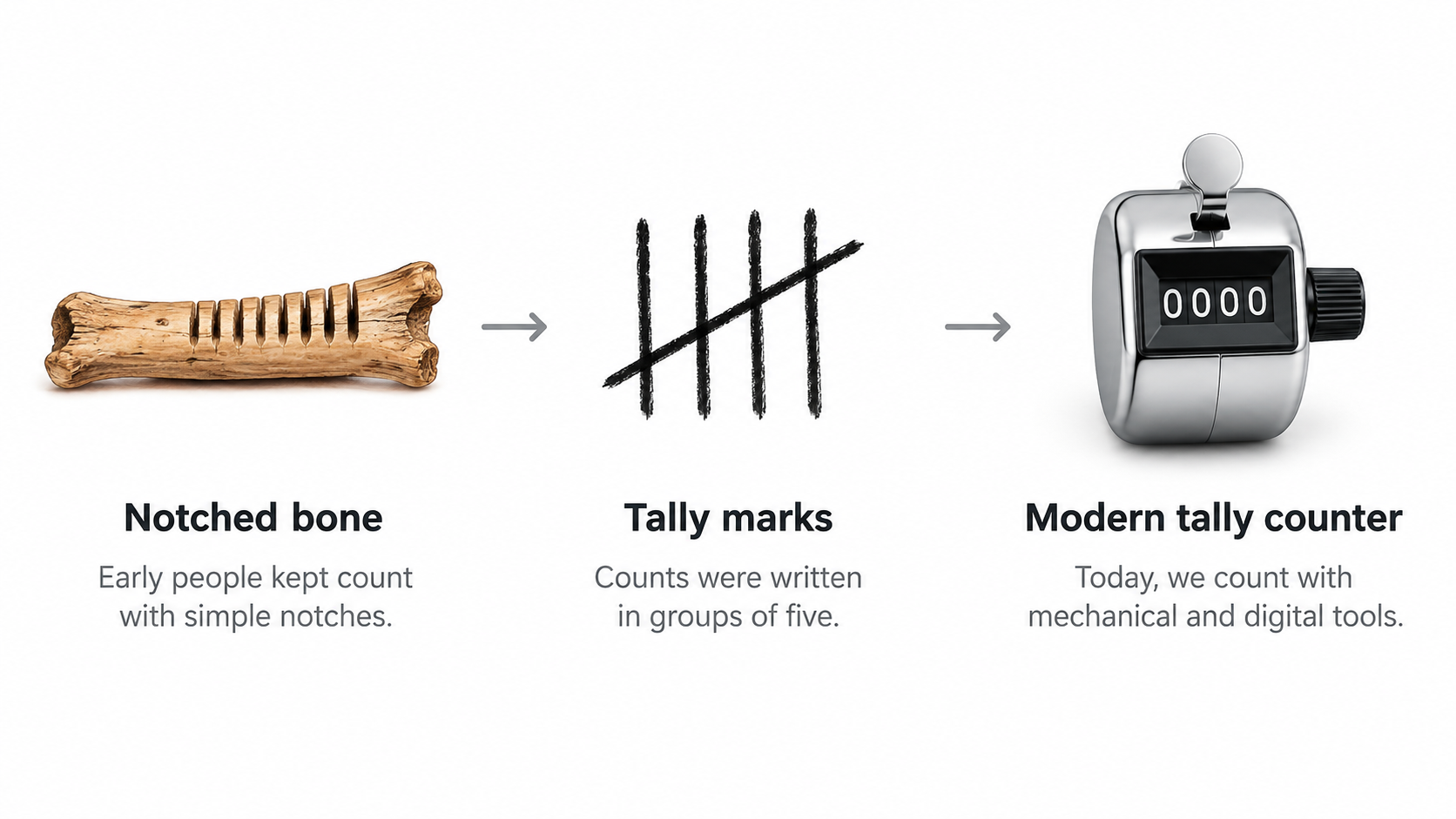
From Notched Bones to Unicode: A Brief Lineage
The Wolf bone is one of the best-documented early examples. It was discovered in 1937 at Dolní Věstonice in Moravia, during excavations led by Karl Absolon, and is dated to the Aurignacian, roughly 30,000 years ago. The bone carries 55 marks that may be tally marks, and the head of an ivory Venus figurine was excavated nearby.
The Ishango bone, found in the Ishango region of the present-day Democratic Republic of Congo, is dated to more than 20,000 years old. On discovery, it was thought to portray a series of prime numbers. As Peter Strom Rudman writes in How Mathematics Happened: The First 50,000 Years (2007, p. 64), “no attempt has been made to explain why a tally of something should exhibit multiples of two, prime numbers between 10 and 20, and some numbers that are almost multiples of 10.” Alexander Marshack examined the bone microscopically in 1971 and concluded it may represent a six-month lunar calendar.
Calendar use also appears at Little Salt Spring, where artifacts suggest a tally system used for calendric purposes about 10,000 years ago. As Caleb Everett notes in Numbers and the Making of Us (2017, p. 33), “the antler ‘calendar’ at Little Salt Spring may represent one of the clearest cases of a Paleolithic tool used for tracking the lunar cycle.”
Clustering into fives is the other long-running convention. Tally marks are typically grouped in fives for legibility — a pattern that also appears in Chinese-character tallying, where the character 正 is built from five strokes. The same source notes that the claimed advantage of five over ten for easy identification is marked as needing a citation, so the grouping convention is well attested while the explanation for it remains less firmly documented.
The lineage reaches modern standards as well. Ken Lunde and Daisuke Miura submitted proposals to encode tally marks in the Unicode Standard in 2015 and again in 2016. Ultimately, the box tally and dot-and-dash tally characters were not accepted; only five ideographic tally marks and two Western tally digits were added to the Counting Rod Numerals block in Unicode version 11.0 in June 2018. Only the tally marks for 1 and 5 are encoded, with 2, 3, and 4 intended to be composed from sequences of the mark for 1.
Name Collision: The ‘Tally’ Chrome Extension Is Not a Counter
Searching for “tally” software turns up a tool that has nothing to do with counting objects. Tally — Claude token counter is a Chrome extension that tracks remaining Claude messages, splits chats, and moves conversations to other AI tools. It has 100,000 users and 2.4K ratings averaging 4.5 stars, with version 0.4.2 updated August 31, 2026. The developer states it is not affiliated with Anthropic.
The shared word is the only connection. If you want a device or app that counts laps, reps, or people, this extension will not do it.
Conclusion
A tally counter is the same simple idea in four forms — a mechanical clicker, a digital counter, a phone or watch app, or a desktop tool — and the right choice depends on how long you count, where you count, and whether you need the data afterward. Start by confirming how long a single session will run and where you will count, then choose hardware or an app. If you buy a mechanical unit, verify the digit count (four is standard), the reset mechanism, and the housing material, and check the actual specs and per-unit price that marketplace listings often leave unstated.
FAQ
How do you use a tally counter?
Hold the body in one hand with the button under your thumb, then press fully and release once per item. Full presses matter — half-pressing can skip or double a count. On mechanical models, the side knob resets to zero; digital units use a reset button, and apps use a tap or swipe. Keep your eyes on the target, not the display.
How many digits does a standard hand tally counter have, and what happens when you reach 9,999?
Most consumer handheld counters show four digits, covering 0 to 9,999 in a single cycle. Press once past 9,999 and the display rolls back to 0000 with no error and no warning, so the count simply restarts. For longer sessions, record a subtotal before rollover or use a digital counter or app with a higher ceiling.
How do you reset a tally counter to zero?
Mechanical counters reset by rotating the knob on the side of the housing until the wheels read zero. Digital models use a reset button, and some require a deliberate long press to prevent accidental clearing mid-count. Apps typically offer a tap-to-reset icon, a swipe gesture, or a reset control on a widget. Resetting is safe, though the knob is a part that wears down.
What is the difference between a tally counter and tally marks?
Tally marks are a notation system — written strokes, traditionally grouped in fives, used to record a running total by hand. A tally counter is a physical or software device that advances a displayed number automatically with each press. Both track cumulative counts, but one relies on writing and the other on a mechanism.
Is there a tally counter app for iPhone and Apple Watch?
Yes. Tally Counter: Tap & Count supports iPhone, iPad, Apple Watch (watchOS 10.0 or later), and Macs with an Apple M1 chip or later, requiring iOS 17.0 or later. The listing shows United States pricing of $0.99 per week or $4.99 per year, with version 1.30 dated 7 September. Alternatives listed in the App Store include CountHub, Count Me, Countr, and Counter Widget 26 — or skip the install entirely with a browser-based tally counter.
Why do some tally counters say “pitch counter” or “lap counter” instead of “tally counter”?
These are the same type of device, named for the job rather than the mechanism. A pitch counter tracks pitches in baseball or softball and is usually a small one-handed unit. A lap counter tracks swimming or running laps and sometimes records segments. When buying, match the form factor to your activity — the underlying function is still one press, one count.